AWS Lambda Managed Instances (Part 3 - Runtime Considerations)

If you've been following this series, you know what AWS Lambda Managed Instances (LMI) are and what they cost. In Part 1 we covered the overview and in Part 2 we dug into the cost model. Now it's time to answer the question that actually matters for day-to-day development: will my existing Lambda code work on LMI, and what will I need to change?
The short answer is: maybe - and possibly quite a bit.
The execution model is fundamentally different from on-demand Lambda. Don't assume your code will behave the same way - some of these differences will silently corrupt your data, and others will just make your life harder. Read through all of them before migrating anything to production.
This post focuses on Python and Node.js runtimes. LMI also supports Java 21+ and .NET 8+, but the concurrency models for those runtimes are outside the scope of this post.
How Does AWS Lambda On-Demand Segregate Execution Environments?
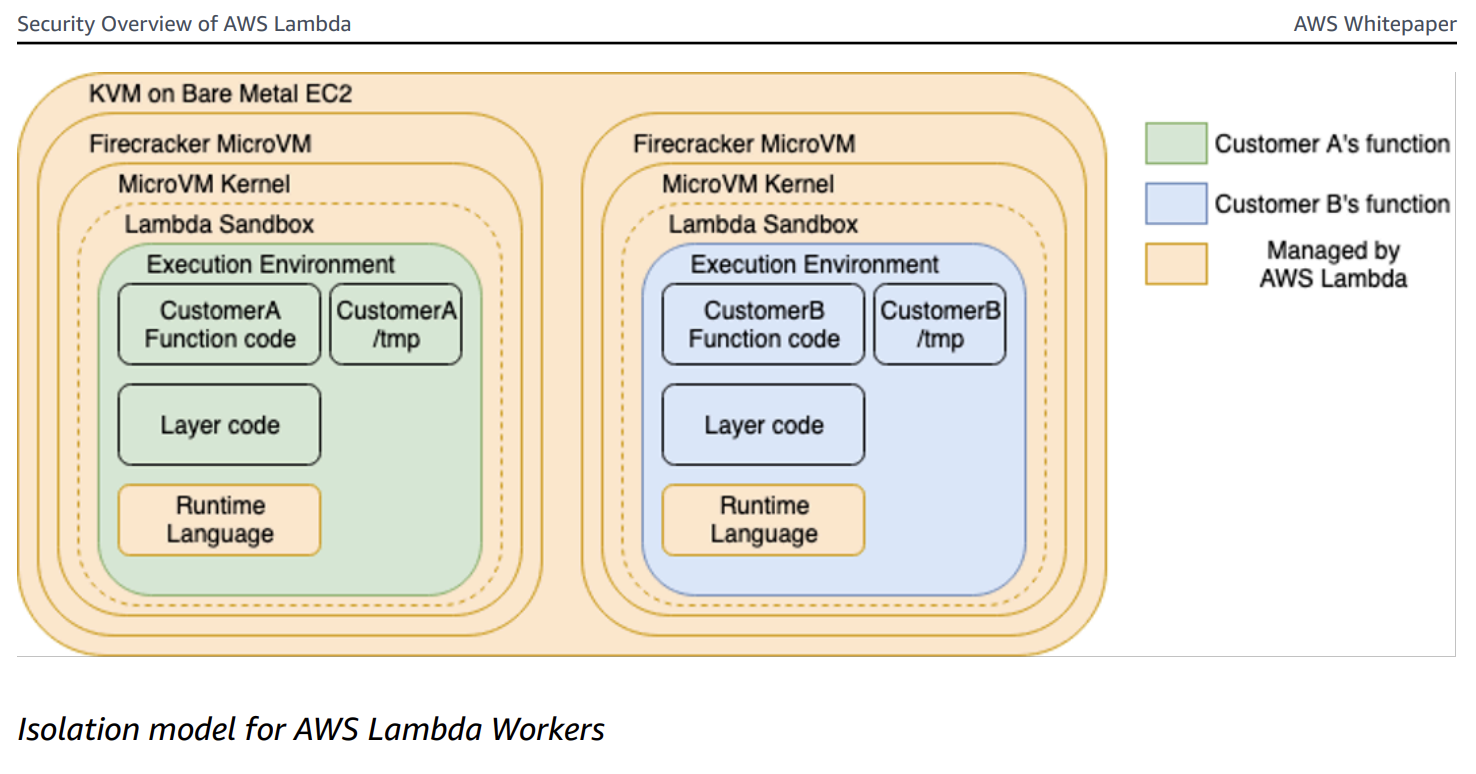
If you're a seasoned Lambda developer, you may already know this. If not, don't worry - I'll provide just enough context so the rest of the post makes sense. This is pulled from the Security Overview of AWS Lambda whitepaper.
On-demand Lambda creates its execution environments on a fleet of Amazon EC2 instances called Lambda Workers. Workers are bare metal Amazon EC2 AWS Nitro instances launched and managed by Lambda in a separate isolated AWS account not visible to customers. Workers have one or more hardware-virtualized Micro Virtual Machines (MVMs) created by Firecracker - an open-source Virtual Machine Monitor (VMM) that uses Linux's Kernel-based Virtual Machine (KVM).
As far as the Lambda function is concerned, it is the only thing running in its MVM. There is no sharing resources amongst multiple executions. There is one execution per execution environment.
How Does AWS Lambda Managed Instances Segregate Execution Environments?
This is where things change.
In AWS LMI, multiple invocations run concurrently inside the same execution environment on EC2 instances. Rather than the strict one-invocation-per-MVM model of on-demand Lambda, LMI runs multiple runtime workers within the same execution environment - each worker handles an individual invocation simultaneously.
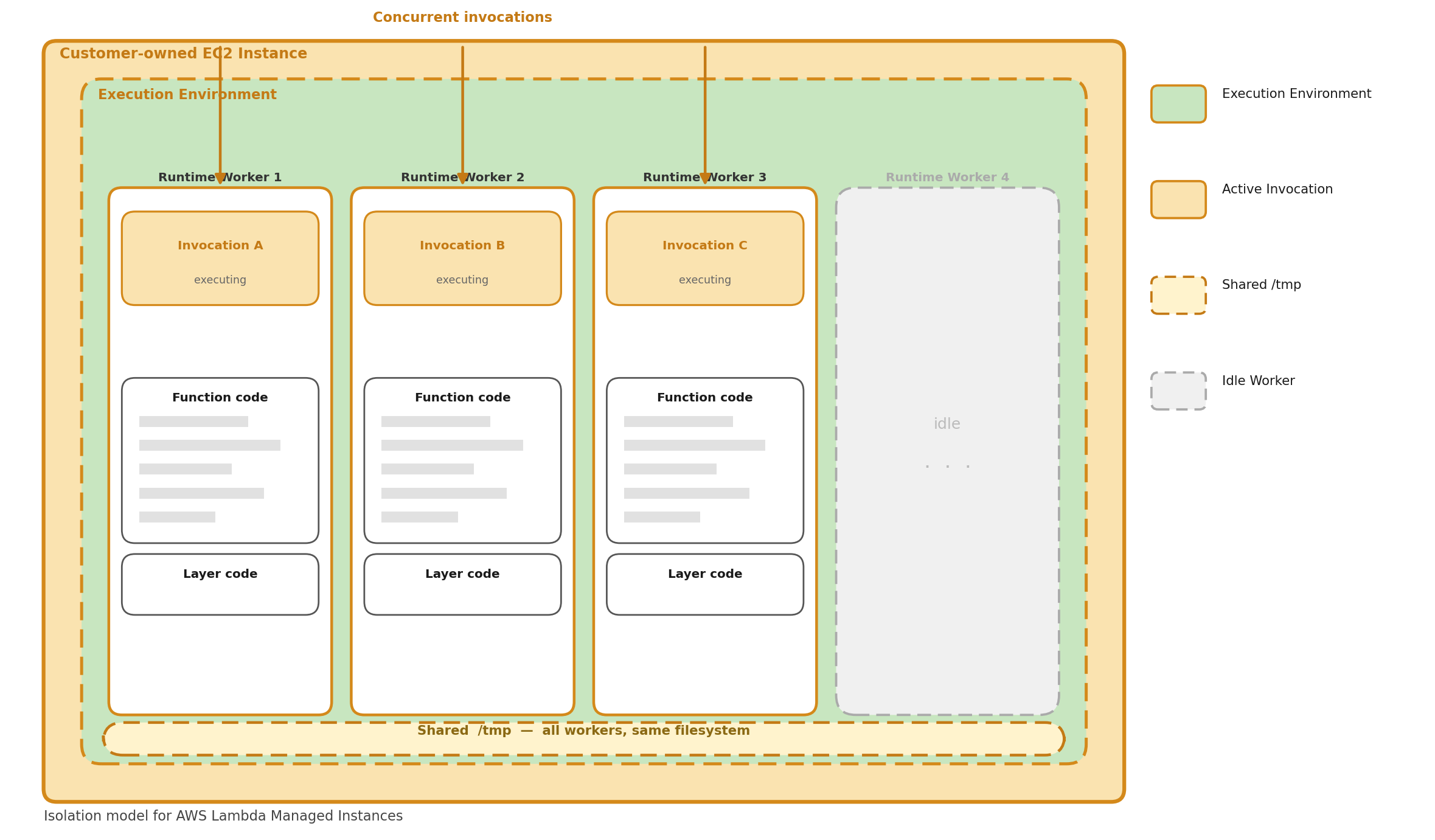
A few key behaviors fall out of this model:
Continuous operation Unlike on-demand Lambda, the execution environment stays continuously active. It doesn't freeze between invocations - it's always ready to pick up the next one.
Parallel processing Multiple invocations execute simultaneously, each handled by a separate runtime worker. The number of workers is configured when you set up the managed instance.
Backpressure handling If all runtime workers are busy, new invocation requests are rejected until a worker becomes available. This is a significant behavioral difference from on-demand - there's no fast scale-out to absorb a burst. Think minutes, not seconds.
Independent timeouts. The function timeout applies per-invocation. If one invocation times out, Lambda marks that invocation as failed but does not terminate the execution environment or interrupt other running invocations.
There are implications for each runtime, and they fall into two categories:
- 🔴 Correctness issues — these will silently break your function or corrupt data if you don't address them. (Considerations 1–4)
- 🟡 Best practice issues — these won't crash your function today, but will make debugging and operation significantly harder. (Considerations 5–7)
🔴 Consideration 1: Global Mutable State
In on-demand Lambda, you could safely mutate module-level variables during a request because only one invocation ran at a time. With LMI, multiple invocations share the same process or threads — mutating global state causes data leaks between requests.
The takeaway: Python gets a free pass here thanks to process isolation — global variables are safe between concurrent invocations. Node does not. Any module-level variable in Node that gets written during a request is a data leak waiting to happen. Scope everything to the handler.
Python
Good news — Python uses separate processes per concurrent request, so global variables are isolated between invocations. However, if you use shared resources like files or external caches, the same principles apply.
Python sample
# ✅ SAFE on Managed Instances — Python uses process-based isolation.
#    Each concurrent request gets its own process with its own memory space.
#    Global variables are NOT shared between concurrent invocations.

current_user = None

def handler(event, context):
    global current_user
    current_user = event["user_id"]
    result = process(current_user)
    # In Python on Managed Instances, this is safe because each
    # invocation runs in a separate process with its own copy of current_user.
    return {"user": current_user, "result": result}
Node
Node uses worker threads with async concurrency — multiple invocations share the same global scope within a worker thread.
Node sample - broken ❌
// ❌ BROKEN — global state is shared across concurrent async invocations
let currentUser = null;
let requestData = null;

export const handler = async (event, context) => {
  currentUser = event.userId;
  requestData = event.data;
  await processData(requestData);    // yields control to event loop
  // Another invocation may have overwritten currentUser by now
  return { user: currentUser };      // WRONG user!
};
Node sample - fixed ✅
// ✅ FIXED — use local variables scoped to the handler invocation
export const handler = async (event, context) => {
  const currentUser = event.userId;  // local, not shared
  const requestData = event.data;
  await processData(requestData);
  return { user: currentUser };      // always correct
};
🔴 Consideration 2: Shared /tmp
In on-demand Lambda, /tmp was yours and yours alone per invocation. With LMI, all concurrent invocations within an execution environment share /tmp, regardless of runtime. This is the one gotcha that hits every language, including Python (despite its process isolation).
The takeaway: If you write to /tmp, always namespace the filename with
context.aws_request_id (or equivalent). Treat /tmp like a shared network drive, not a private scratch space — because on LMI, that's exactly what it is. Also clean up after yourself; with concurrent invocations all writing to the same volume, it's easier than ever to fill it up.
Python
Python sample - broken ❌
import json
import os

# ❌ BROKEN — concurrent invocations overwrite each other's file
def handler(event, context):
    data = transform(event["payload"])
    # Static filename - another execution might write to the same file.
    with open("/tmp/result.json", "w") as f:
        json.dump(data, f)
    # Another process may have overwritten /tmp/result.json
    # before you have a chance to read and return it.
    with open("/tmp/result.json", "r") as f:
        return json.load(f)  # could be another request's data!
Python sample - fixed ✅
import json
import os

# ✅ FIXED — use request ID for unique file names
def handler(event, context):
    request_id = context.aws_request_id
    filepath = f"/tmp/result-{request_id}.json"
    data = transform(event["payload"])
    try:
        with open(filepath, "w") as f:
            json.dump(data, f)
        with open(filepath, "r") as f:
            return json.load(f)
    finally:
        # Best effort cleanup to avoid filling /tmp.
        os.remove(filepath)
Node
Node sample - broken ❌
import { writeFileSync, readFileSync } from "fs";

// ❌ BROKEN — same file path used by concurrent invocations
export const handler = async (event, context) => {
  // Static filename - another invocation might write to the same file.
  writeFileSync("/tmp/data.json", JSON.stringify(event.payload));
  // Another worker thread may overwrite the file here.
  const data = JSON.parse(readFileSync("/tmp/data.json", "utf8"));
  return data;  // could be another request's data!
};
Node sample - fixed ✅
import { writeFileSync, readFileSync, unlinkSync } from "fs";

// ✅ FIXED — use request ID for unique file names
export const handler = async (event, context) => {
  const filepath = `/tmp/data-${context.awsRequestId}.json`;
  try {
    writeFileSync(filepath, JSON.stringify(event.payload));
    const data = JSON.parse(readFileSync(filepath, "utf8"));
    return data;
  } finally {
    try { unlinkSync(filepath); } catch {}
  }
};
🔴 Consideration 3: Database Connections
In on-demand Lambda, a single database connection per execution environment is fine — only one invocation used it at a time. With LMI, multiple concurrent invocations need their own connections, or they'll collide.
The takeaway: A single module-level connection was a common and acceptable Lambda pattern on-demand. On LMI it becomes a concurrency bug. Use connection pools sized appropriately for your worker count, and always return connections in a finally block. As a rule of thumb, your pool max should be at least equal to the number of configured runtime workers.
Python
Python sample - broken ❌
import psycopg2

# ❌ BROKEN — single connection shared across processes.
# Python processes are isolated in memory, but if you're using a module-level
# connection in a threaded context, or sharing via an external resource, this fails.
conn = psycopg2.connect(dsn)

def handler(event, context):
    cursor = conn.cursor()  # not safe if connection is shared
    cursor.execute("SELECT * FROM users WHERE id = %s", (event["user_id"],))
    return cursor.fetchone()
Python sample - fixed ✅
from psycopg2 import pool

# ✅ FIXED — connection pool
# Each process gets its own pool instance due to Python's process-based isolation,
# but pooling is still best practice for connection reuse within a process.
connection_pool = pool.ThreadedConnectionPool(1, 10, dsn)

def handler(event, context):
    conn = connection_pool.getconn()
    try:
        cursor = conn.cursor()
        cursor.execute("SELECT * FROM users WHERE id = %s", (event["user_id"],))
        return cursor.fetchone()
    finally:
        connection_pool.putconn(conn)
Node
Node sample - broken ❌
import pg from "pg";

// ❌ BROKEN — single client shared across concurrent async invocations
const client = new pg.Client(connectionString);
await client.connect();

export const handler = async (event) => {
  // Concurrent queries on the same client cause unpredictable behavior
  const result = await client.query(
    "SELECT * FROM users WHERE id = $1",
    [event.userId]
  );
  return result.rows[0];
};
Node sample - fixed ✅
import pg from "pg";

// ✅ FIXED — use a connection pool
const pool = new pg.Pool({ connectionString, max: 10 });

export const handler = async (event) => {
  const client = await pool.connect();
  try {
    const result = await client.query(
      "SELECT * FROM users WHERE id = $1",
      [event.userId]
    );
    return result.rows[0];
  } finally {
    client.release();
  }
};
🔴 Consideration 4: Backpressure and Event Source Configuration
On on-demand Lambda, if your function is overwhelmed with requests, Lambda scales out new execution environments to absorb the load. On LMI, that doesn't happen. When all runtime workers are busy, new invocation requests are rejected until a worker becomes available.
This has direct implications for how you configure event sources:
-
SQS triggers: If invocations are being rejected, messages return to the queue and will be retried based on your visibility timeout. Size your worker count and visibility timeout together — if a message is retried while all workers are still busy, you're just pushing the problem forward. Consider a dead-letter queue to catch messages that can't get through after several attempts.
-
API Gateway / function URLs: Rejected invocations surface as errors to the caller. Make sure your clients implement retry with backoff, and consider whether LMI is the right deployment model for latency-sensitive, bursty workloads.
-
EventBridge / async invocations: Lambda will retry async invocations on failure, but rejections under backpressure count as failures. Review your retry policy and destination configuration.
The takeaway: LMI shifts the scaling responsibility from Lambda's infrastructure to your configuration. There's no automatic relief valve when traffic spikes — you need to engineer for it explicitly through worker count sizing, event source configuration, and retry/DLQ strategy.
🟡 Consideration 5: Logging
LMI functions use a structured JSON logging format that includes requestId in every log line. This is important — without it, interleaved log output from concurrent invocations is nearly impossible to untangle in CloudWatch.
Powertools for AWS Lambda (Python) and Powertools for AWS Lambda (TypeScript) both support LMI and make this straightforward. Capture Lambda context (including function_request_id) in Python
and Node, and use thread-safe keys to enrich your logs in Python
and Node.
The takeaway: Structured JSON logging with requestId is non-negotiable on LMI — without it, interleaved log lines from concurrent invocations are nearly impossible to untangle. Powertools handles this for you out of the box; use it.
Python
Python sample - without Powertools ❌
# ❌ WITHOUT Powertools — plain print statements have no request context.
#    Concurrent invocations produce interleaved output with no way to
#    correlate a log line to a specific request.

def handler(event, context):
    print(f"Processing event for user {event['user_id']}")
    result = process(event)
    print(f"Done processing")
    return result
Python sample - with Powertools ✅
# ✅ WITH Powertools — structured JSON logs with requestId correlation.
#    Every log line includes function_request_id automatically once
#    you inject the Lambda context.

from aws_lambda_powertools import Logger

logger = Logger()

@logger.inject_lambda_context
def handler(event, context):
    logger.info("Processing event", user_id=event["user_id"])
    result = process(event)
    logger.info("Done processing")
    return result
Node
Node sample - without Powertools ❌
// ❌ WITHOUT Powertools — console.log has no request context.
//    Impossible to attribute log lines to specific invocations.

export const handler = async (event, context) => {
  console.log(`Processing event for user ${event.userId}`);
  const result = await process(event);
  console.log("Done processing");
  return result;
};
Node sample - with Powertools ✅
// ✅ WITH Powertools — structured JSON logs with requestId correlation.

import { Logger } from "@aws-lambda-powertools/logger";

const logger = new Logger();

export const handler = async (event, context) => {
  logger.addContext(context);
  logger.info("Processing event", { userId: event.userId });
  const result = await process(event);
  logger.info("Done processing");
  return result;
};
🟡 Consideration 6: Thread-safe Collections
If you use shared collections — things like caches, counters, or registries — they need to be concurrency-safe.
The takeaway: Python's process isolation means in-memory caches and counters are safe, but they're also local — each worker process has its own copy, so there's no shared warm cache benefit across concurrent invocations. Node shares a global scope across async invocations, so any collection that gets written at runtime needs an explicit concurrency strategy.
Python
Python process isolation means in-memory collections are safe by default. Each concurrent invocation gets its own process with its own copy. The drawback is that the cache is only available within that process — there is no cross-invocation cache benefit.
Python sample
# ✅ SAFE on AWS LMI — each concurrent invocation gets its own process
#    with its own copy of the cache. No race conditions, but also no
#    sharing of cached values between concurrent invocations.
cache = {}

def handler(event, context):
    key = event["key"]
    if key not in cache:
        cache[key] = expensive_lookup(key)
    return cache[key]
Node
Node sample - broken ❌
// ❌ BROKEN — Map is shared across concurrent async invocations.
//    Race condition between has() check and set().
const cache = new Map();

export const handler = async (event, context) => {
  if (!cache.has(event.key)) {
    cache.set(event.key, await expensiveLookup(event.key));
    // Between the has() check and set(), another invocation may
    // have modified the cache.
  }
  return cache.get(event.key);
};
Node sample - fixed ✅
// ✅ FIXED — deduplicate concurrent lookups for the same key using
//    a pending promises map to avoid redundant in-flight requests.
const cache = new Map();
const pending = new Map();

export const handler = async (event, context) => {
  const key = event.key;
  if (cache.has(key)) return cache.get(key);

  if (!pending.has(key)) {
    pending.set(key, expensiveLookup(key).then(val => {
      cache.set(key, val);
      pending.delete(key);
      return val;
    }));
  }
  return pending.get(key);
};
🟡 Consideration 7: Lambda Lifecycle
The lifecycle for LMI functions differs from on-demand in a few meaningful ways.
Init Phase
On-demand Lambda init does three things: initialize extensions, bootstrap the runtime, and run your function's static initialization code. LMI does all of that too, but with one critical addition: it spawns the configured number of runtime workers before signaling readiness. The init phase isn't complete until at least one runtime worker has called /runtime/invocation/next.
This has a practical implication: LMI init can take significantly longer. On-demand init timeouts are tight; LMI initialization can take up to 15 minutes. The timeout is the greater of 130 seconds or your configured function timeout (up to 900 seconds). If you have cold start monitoring or alarms tuned for on-demand thresholds, revisit them.
Invoke Phase
On-demand Lambda freezes the execution environment between invocations. LMI doesn't — the environment runs continuously, processing work as it arrives. The function timeout still applies, but on a per-invocation basis. One slow or timed-out invocation doesn't take down the environment.
Error Handling
Error handling in LMI is notably different from on-demand:
- Invocation timeouts return a timeout error for that specific invocation but leave the execution environment running. Other concurrent invocations are unaffected.
- Runtime worker crashes are contained — the environment keeps processing with its remaining healthy workers.
- Extension crashes are fatal to the execution environment. If an extension crashes during initialization or operation, the entire environment is marked unhealthy and terminated. Lambda replaces it with a new one.
- No reset/repair On-demand Lambda attempts to reset and reinitialize an execution environment after certain errors. LMI does not — unhealthy containers are terminated and replaced outright.
The takeaway A single bad invocation won't kill the environment, but a crashed extension will — silently, taking any in-flight invocations with it. Make sure your extensions are production-hardened and that your observability captures environment-level termination events, not just individual invocation errors.
Now What? A Migration Checklist
Worth asking before you start: Is LMI actually the right model for this function? LMI is a strong fit for high volume, steady, predictable workloads where you want consistent performance without cold start variance. It's a worse fit for bursty workloads that historically relied on Lambda's scale-out behavior to absorb spikes. If your function sees highly variable traffic, on-demand may still be the right answer.
Before migrating any on-demand Lambda function to LMI, work through this checklist:
Correctness — fix these before migrating:
- No module-level mutable variables written during invocations (Node especially)
- All
/tmpfile paths namespaced withcontext.aws_request_id - Database and external service clients use connection pools, not single connections
- Any shared in-memory collections are either read-only after init, or use an explicit concurrency guard (Node)
Operations — configure these before going to production:
- Powertools installed and configured with Lambda context injection
- SQS visibility timeouts and DLQ configured to account for backpressure-driven retries
- Async event source retry policies reviewed
- Cold start alarms updated to account for LMI's extended init timeout
- Extension dependencies reviewed for stability — an unstable extension takes down the whole environment
This wraps up the three-part series on AWS Lambda Managed Instances. If you missed the earlier posts, Part 1 covers what LMI is and when to use it, and Part 2 breaks down the cost model.
Stay curious! 🚀